to load custody history from AccuTrack's cache, down from 51 seconds crawling the source boards live.
See it in the tourSpreadsheets drift. Devices move, change hands and go out for repair. AccuTrack keeps one record for every device from purchase order to disposal, with MFA for every user and an audit trail that stands up to scrutiny.
Works with the systems you already run
- Microsoft Entra ID
- ServiceNow
- SolarWinds
- Monday.com
- Amazon Web Services
- Microsoft Excel
- SAML 2.0
- OpenID Connect
- QR labels
100%of accounts sign in with multi-factor authentication
<60sto lock out someone you disable or remove
7 yrsof tamper-evident audit log retention
13modules, granted person by person
Figures describe AccuTrack's reference AWS deployment, verified September 2026. Product names belong to their owners.
Product tour
See the actual application in motion.
Eleven real screens that play as you scroll: the tour clicks through the app for you. Pick a scene to jump, tap a marker to zoom in, or press play to let it run on its own. The sample people and devices are not real.
Scene 01 · Operations Overview
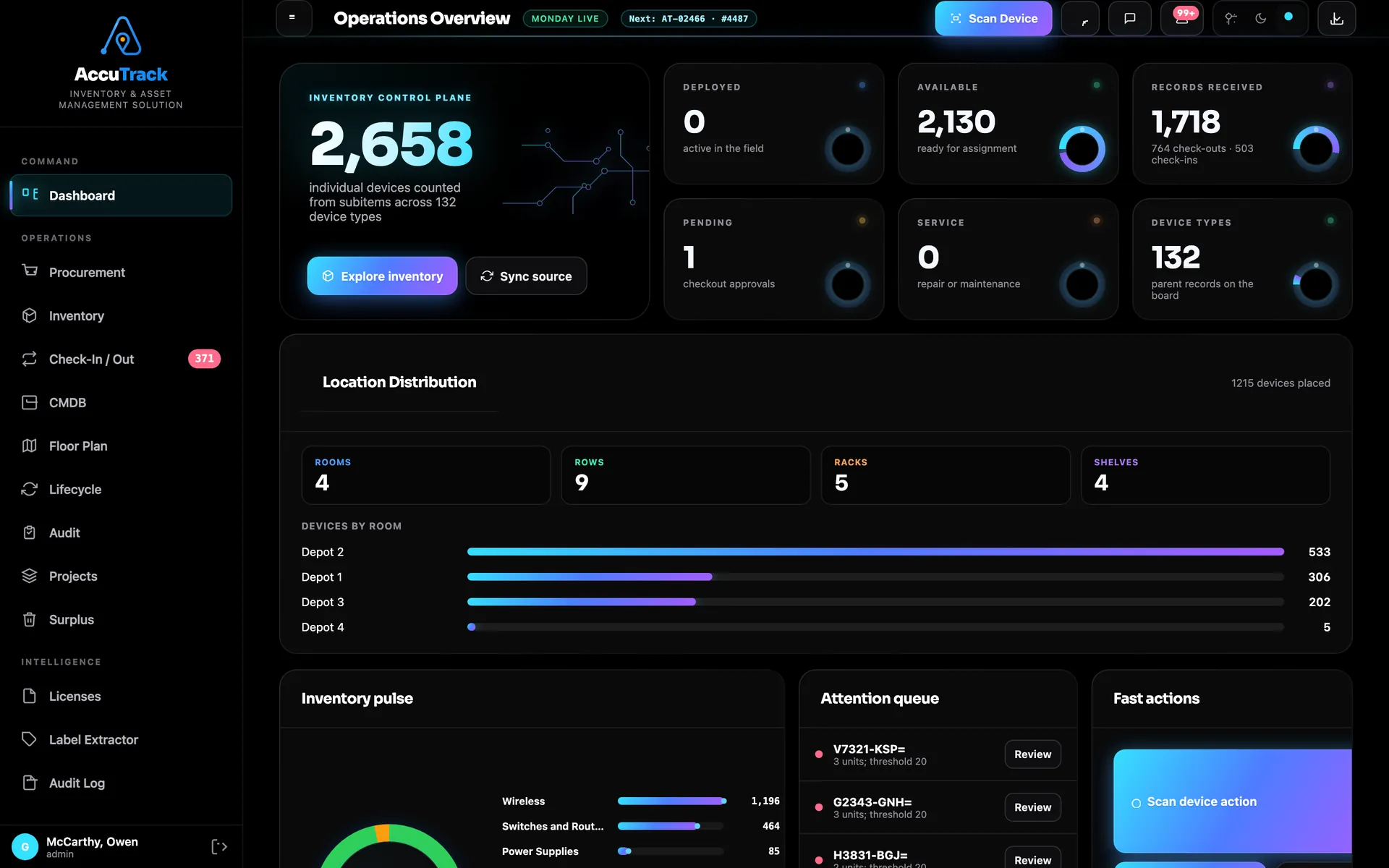
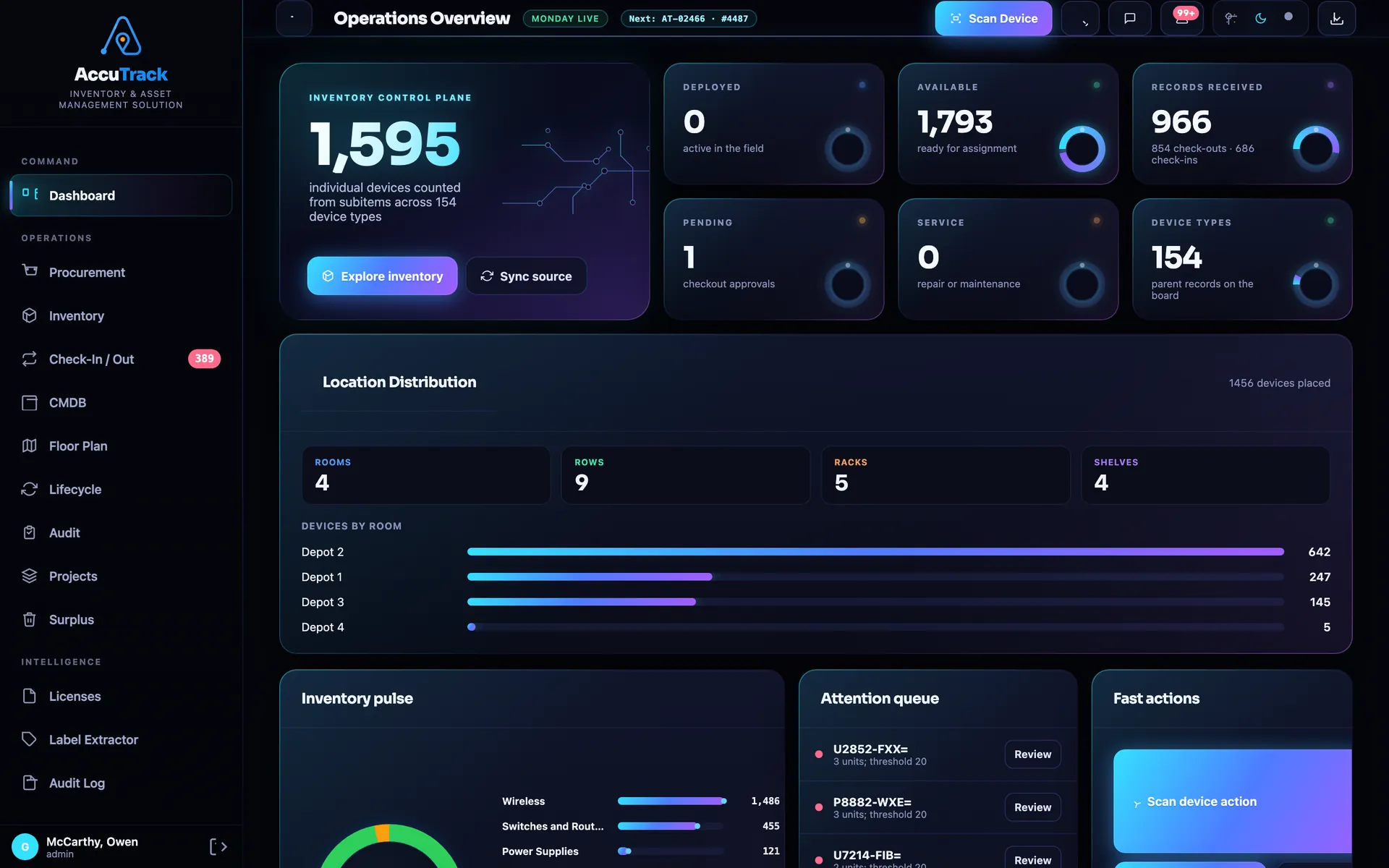
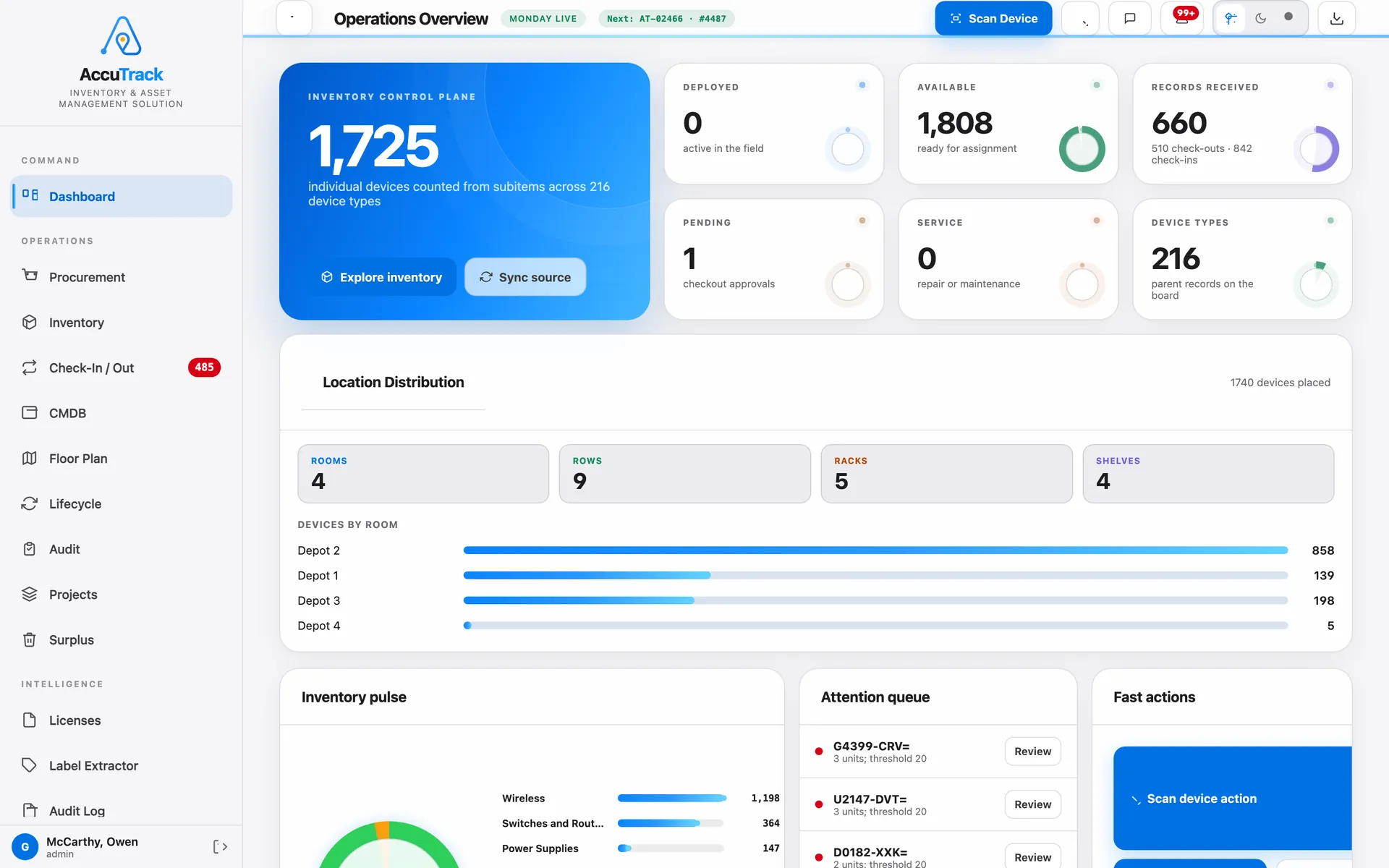
Start on the Operations Overview
Open AccuTrack and the whole estate is on one screen: devices counted from the source board, what is deployed, available, pending or in service, and where everything sits by room.
- Counts refresh from the inventory board every two minutes
- Rooms, rows, racks and shelves at a glance
- An attention queue for parts below threshold
-
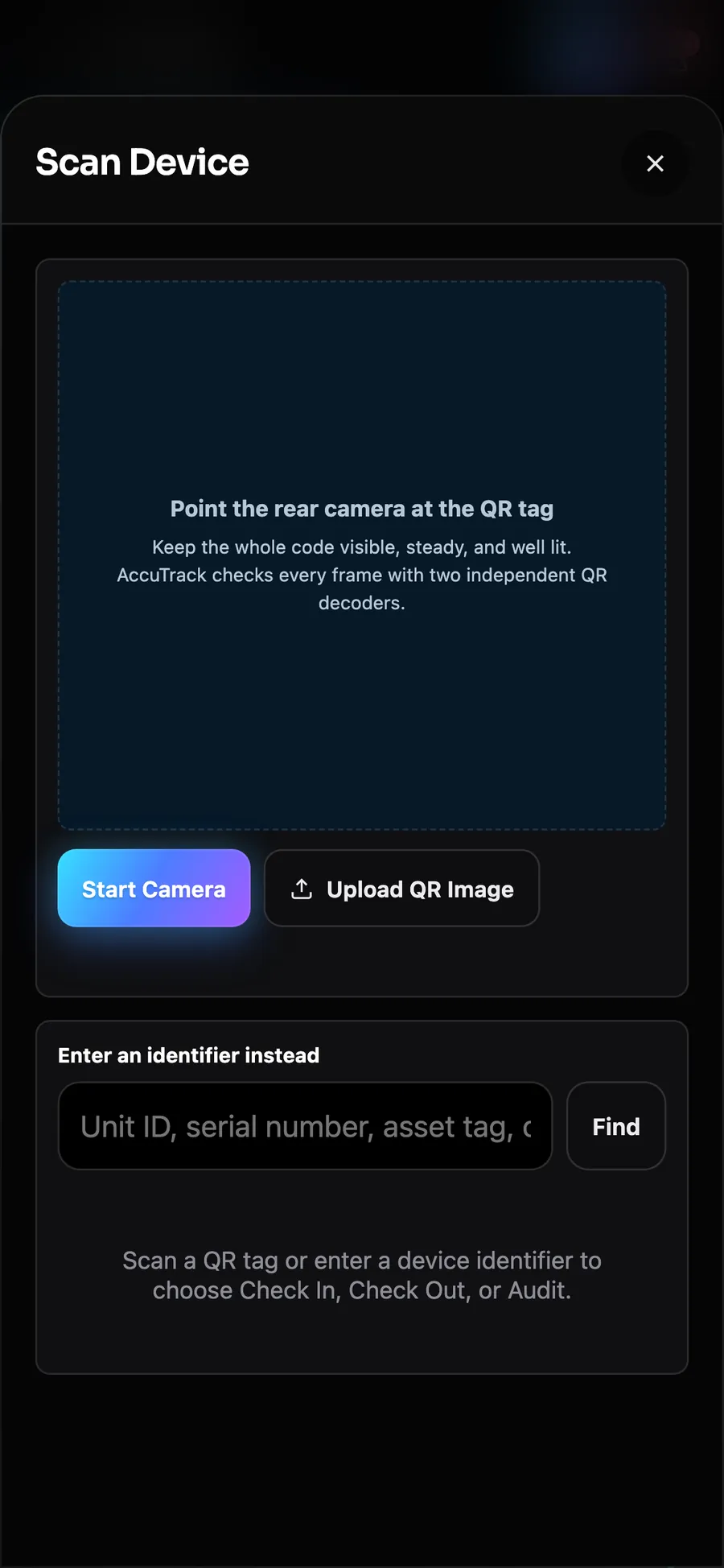
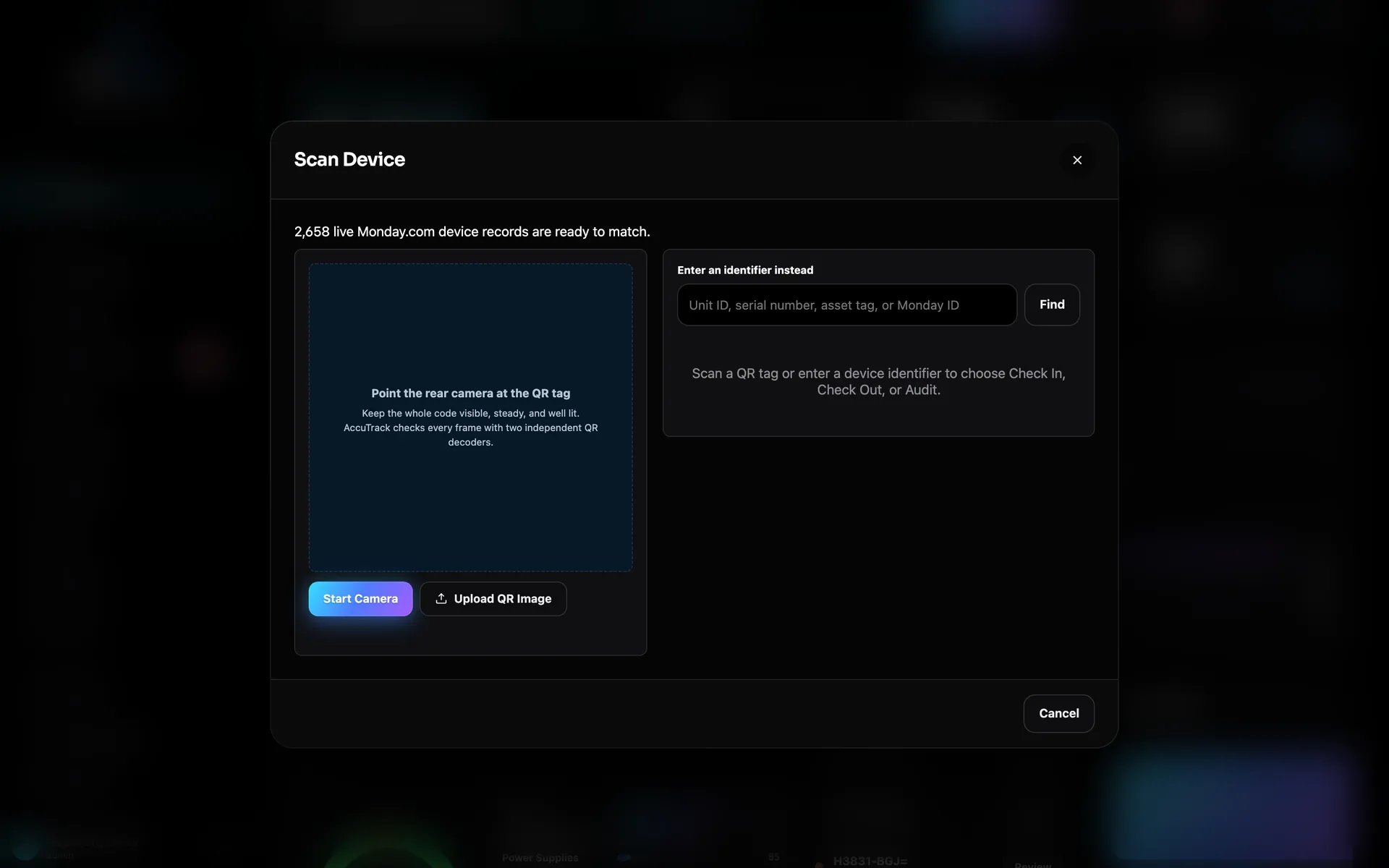
Scan a device from any screen
The Scan Device button sits in the header of every page. Point the camera at a QR tag, upload a photo of one, or type a unit ID, serial number or asset tag, and the device opens with Check In, Check Out or Audit ready to go.
- Two independent QR decoders read every frame
- Upload a label photo when there is no camera
- Find by unit ID, serial number or asset tag
-
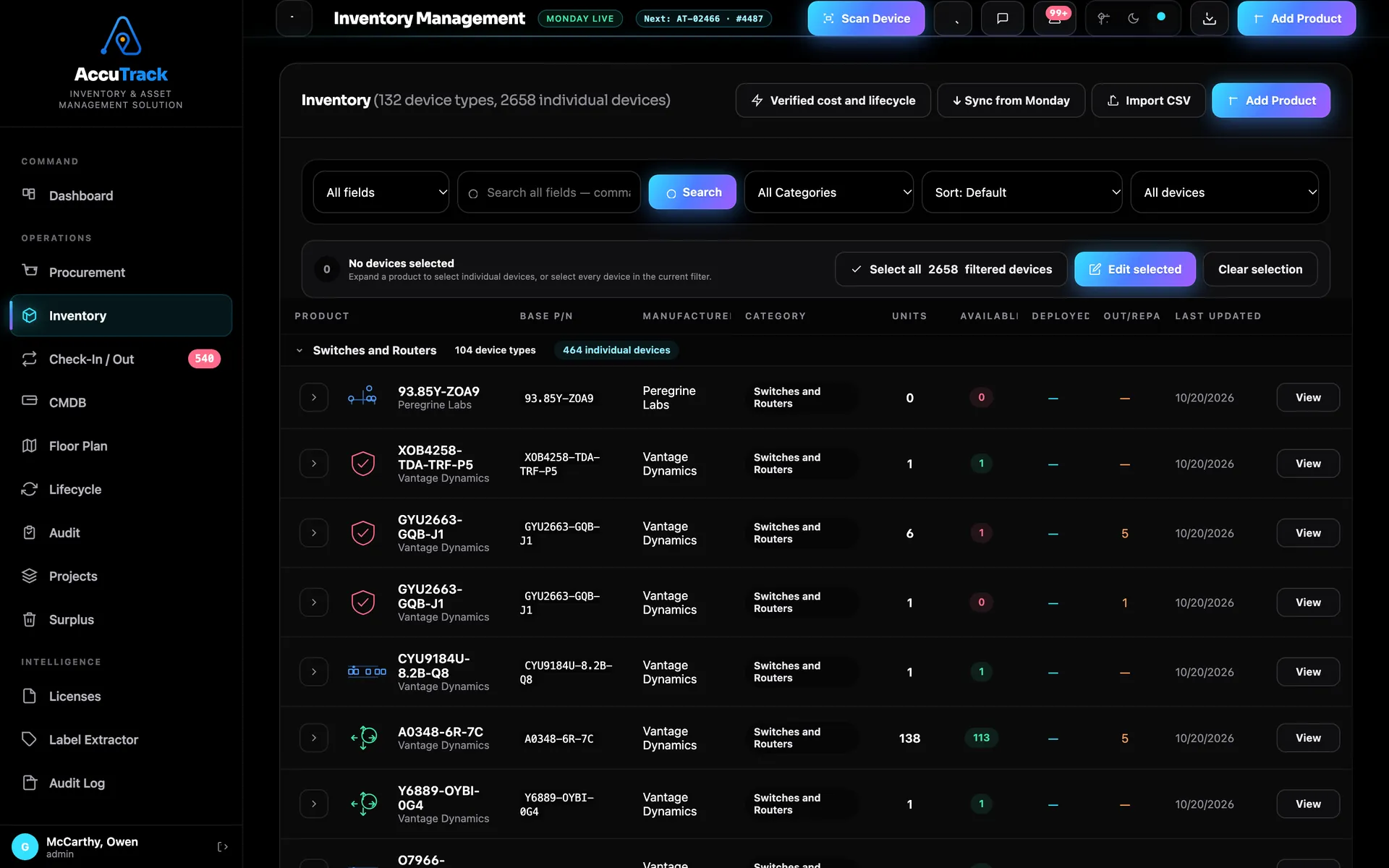
Every device type, every unit, one sheet
Device types group their individual units, so a product with hundreds of units and a product with one sit in the same view. Search any field, filter by category, select everything in a filter and edit it together, or import a CSV.
- Verified cost and lifecycle per product
- Sync from the source board on demand
- Every unit opens its full record
-
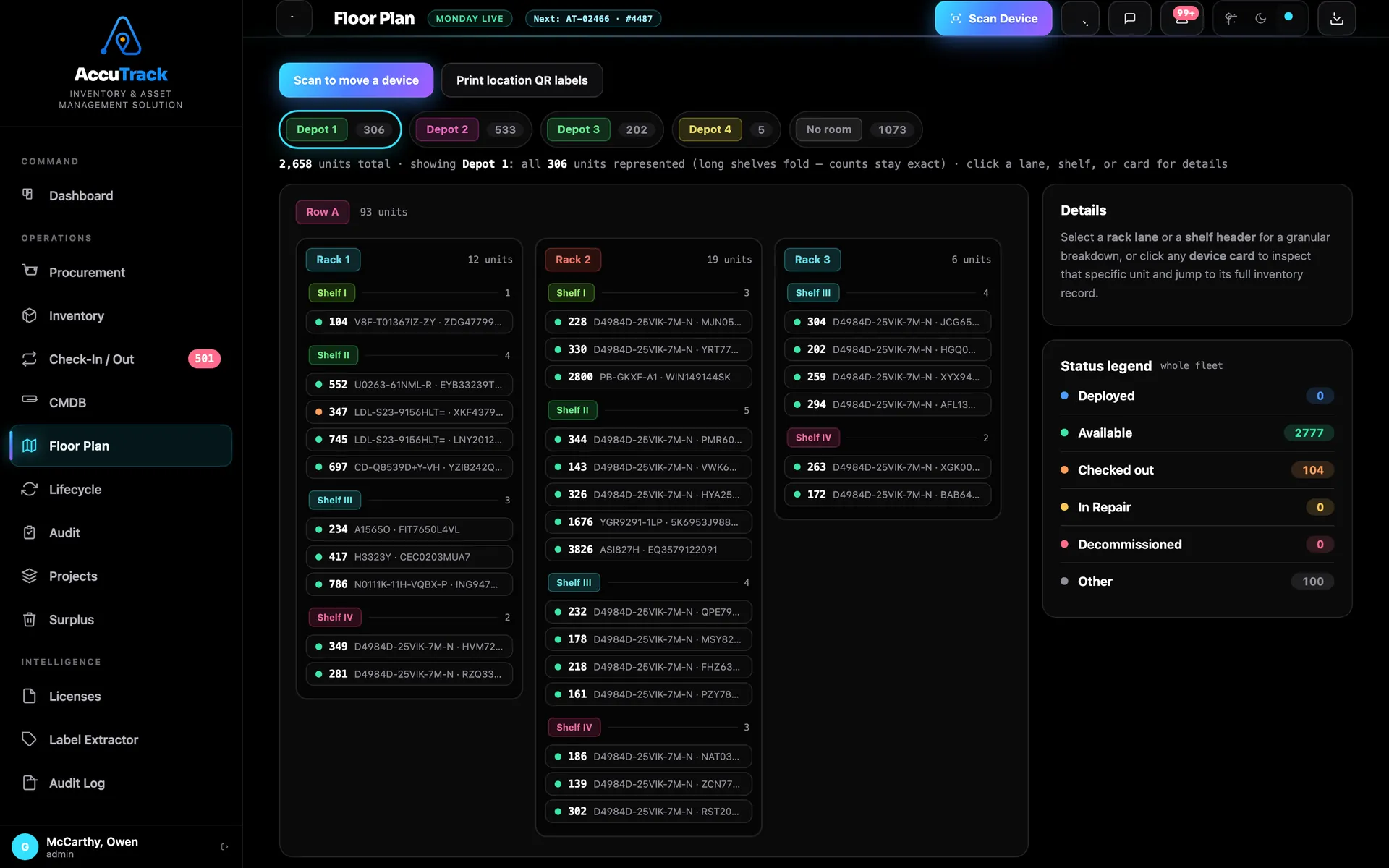
A floor plan you can read without clicking
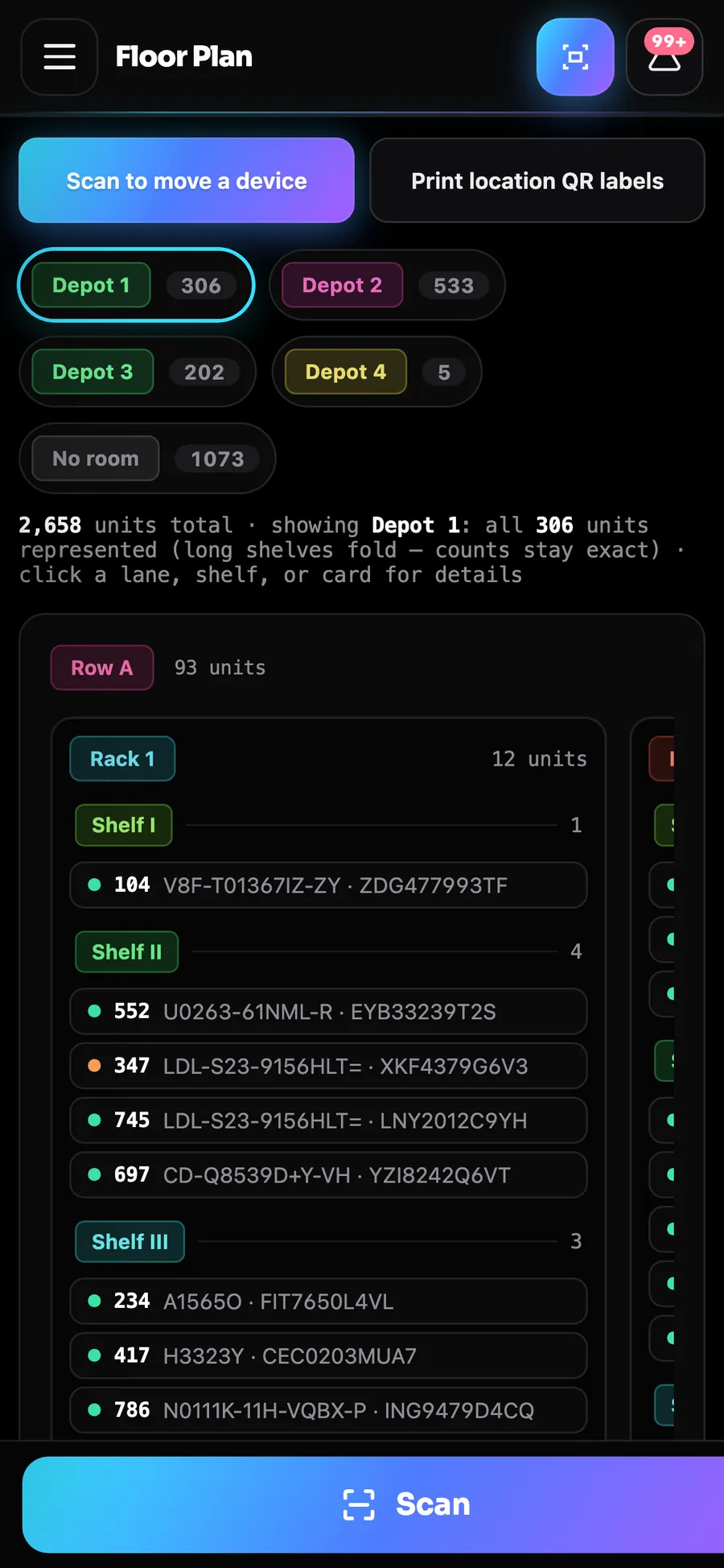
Pick a room and every row, rack and shelf renders as card lanes, with unit, product and serial visible on the card. Scan a device to move it, or print QR labels for the locations themselves.
- Status legend for the whole fleet
- Click a lane, shelf or card for details
- Long shelves fold; the counts stay exact
-
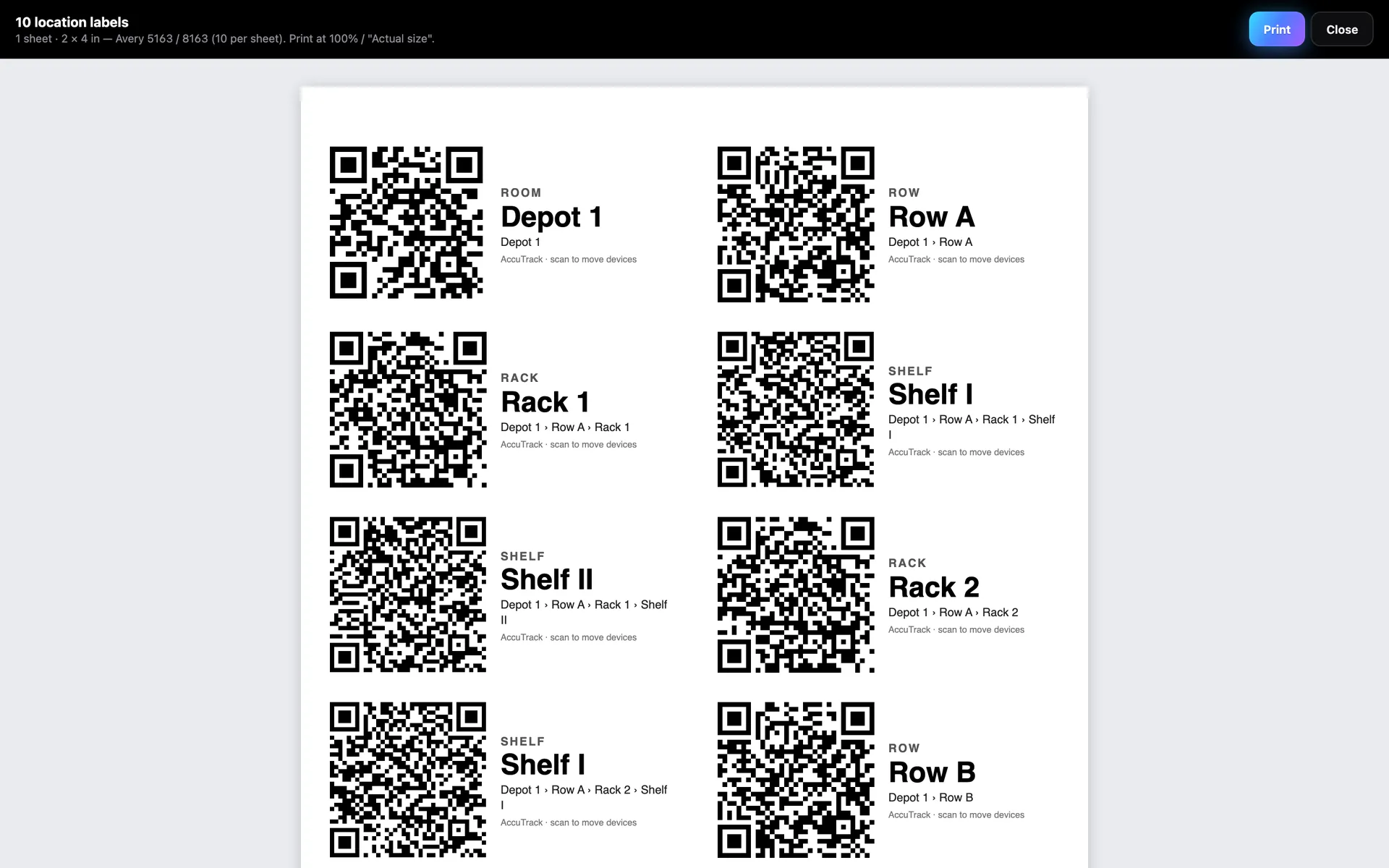
Print a QR label for every location
From the floor plan, print labels for every room, row, rack and shelf, or add locations by hand. The sheet previews before anything prints, on standard 2 × 4 inch label stock, and the same codes drive every move: scan the device, scan where it is, scan where it is going.
- Rooms, rows, racks and shelves, each with its own code
- Ten labels per sheet on standard Avery stock
- Asset tags for devices print the same way
-
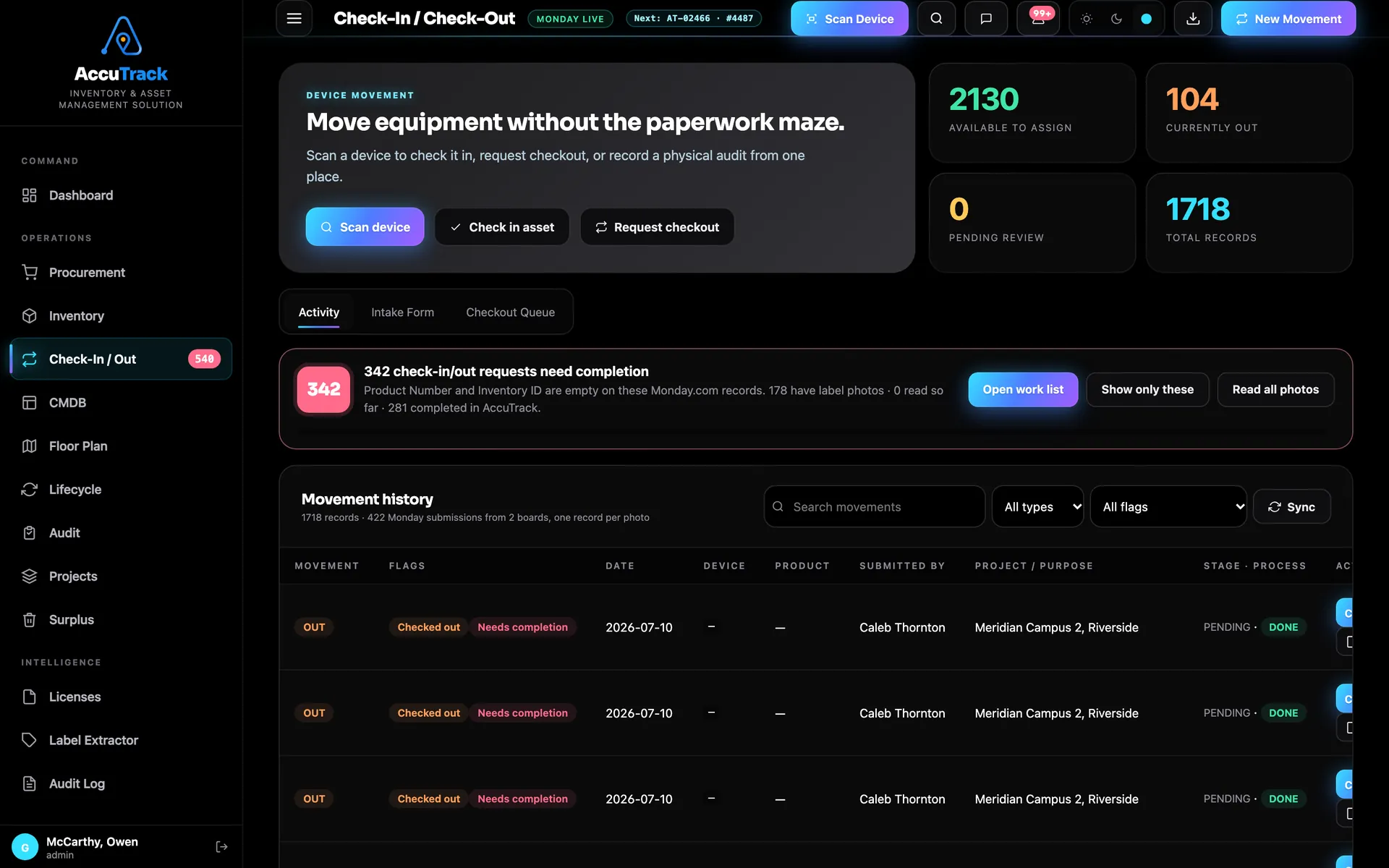
Movement without the paperwork maze
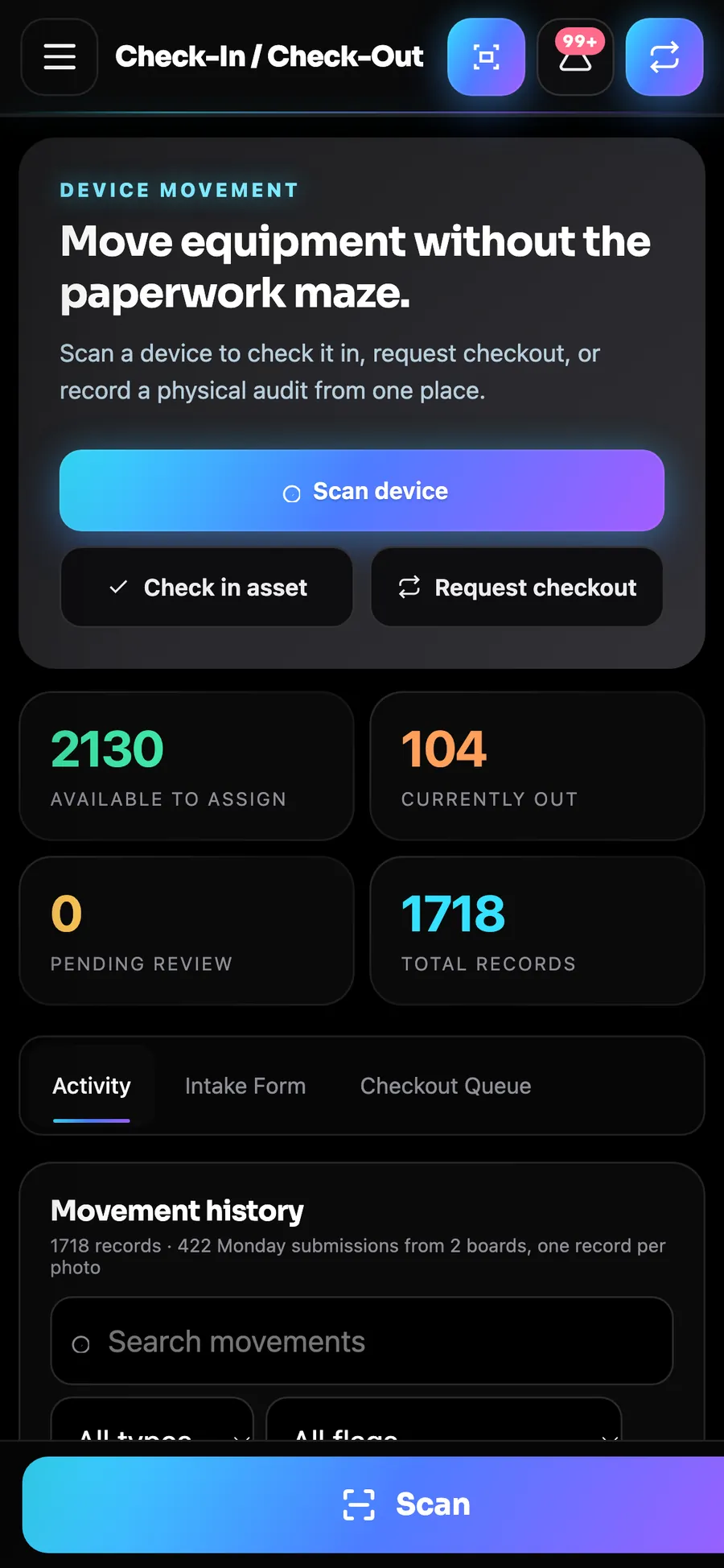
Scan a device to check it in, request a checkout, or record a physical audit from one place. Submissions that arrive without a product number or inventory ID land in a work queue with their label photos ready to read.
- Movement history from two intake boards, one record per photo
- Needs-completion flags with photo reads
- Admin one-tap checkout for the people who do it all day
-
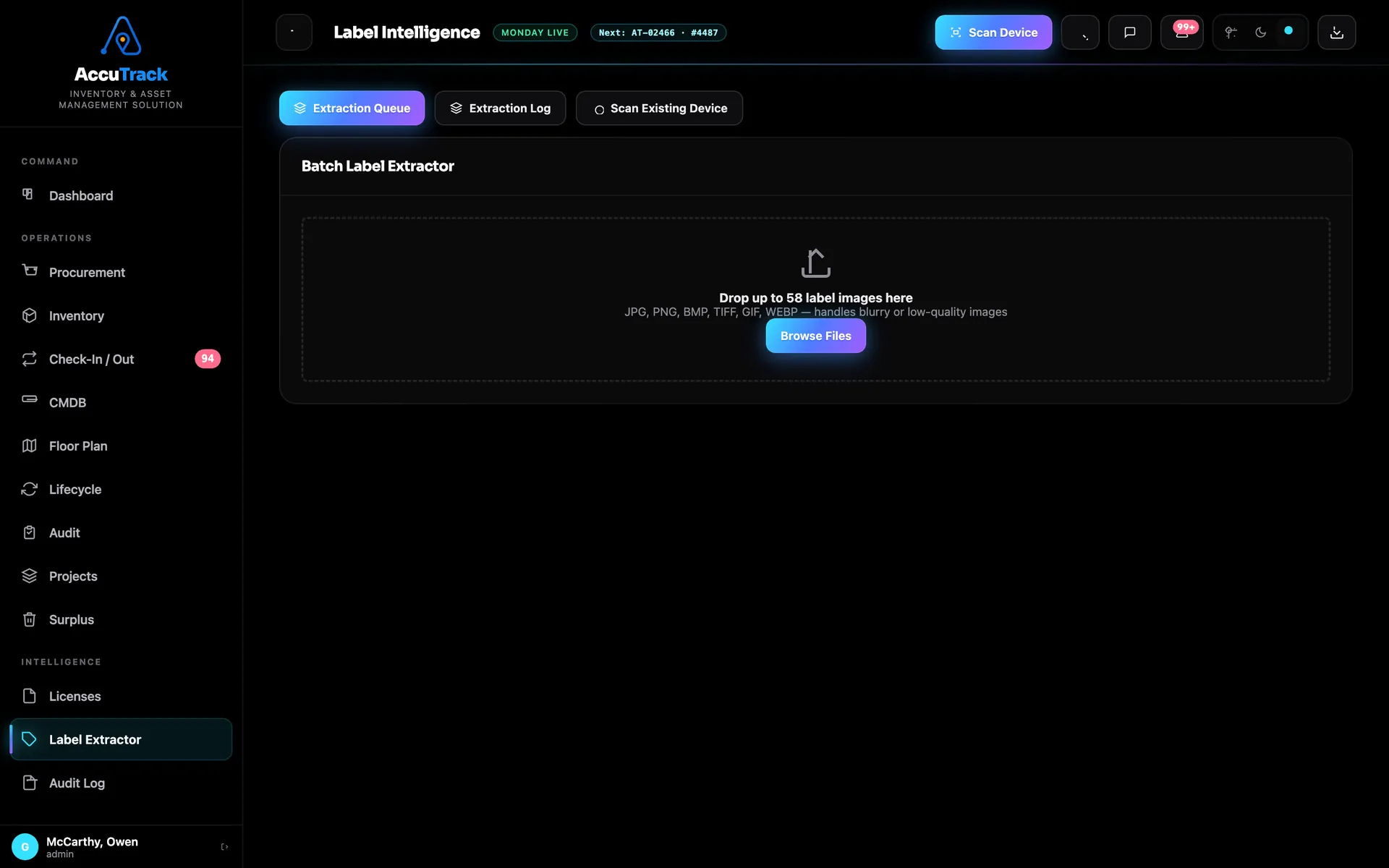
QR labels, printed and read back
Print a QR label for any device or location, and let the extractor read label photos back into records: drop a batch of photos and AccuTrack pulls the identifiers out, including blurry or low-quality shots.
- Batch extraction from label photos
- Scan an existing device to open its record
- Location labels printed straight from the floor plan
-
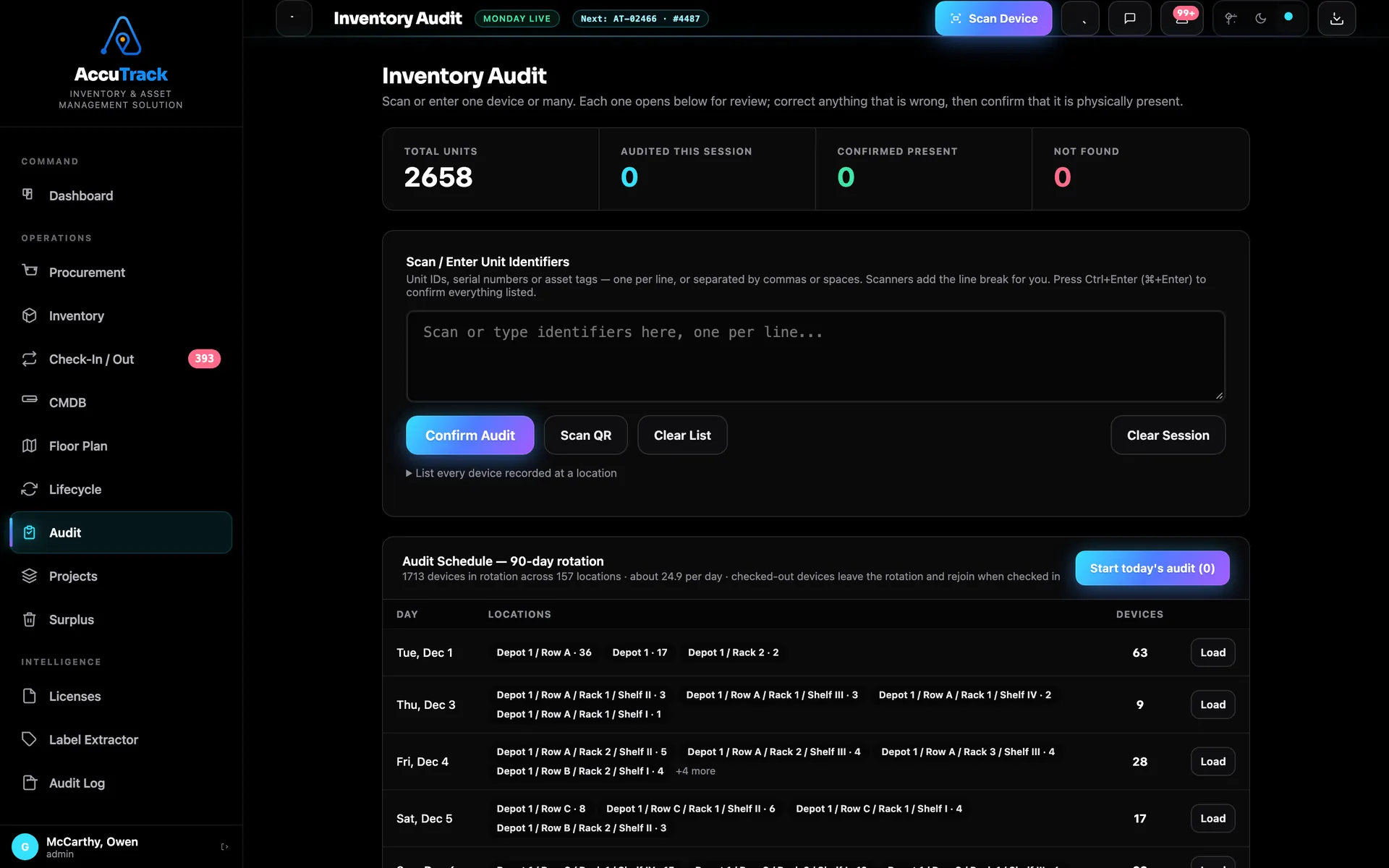
Audits that run on a schedule, not a panic
Scan QR labels or type identifiers one per line; each device opens for review and is confirmed present. A 90-day rotation schedules every location, so the whole fleet is touched each quarter and nothing is a surprise.
- Confirmed present and not found, counted per session
- A daily plan with the locations to visit
- Not-found devices flagged immediately
-
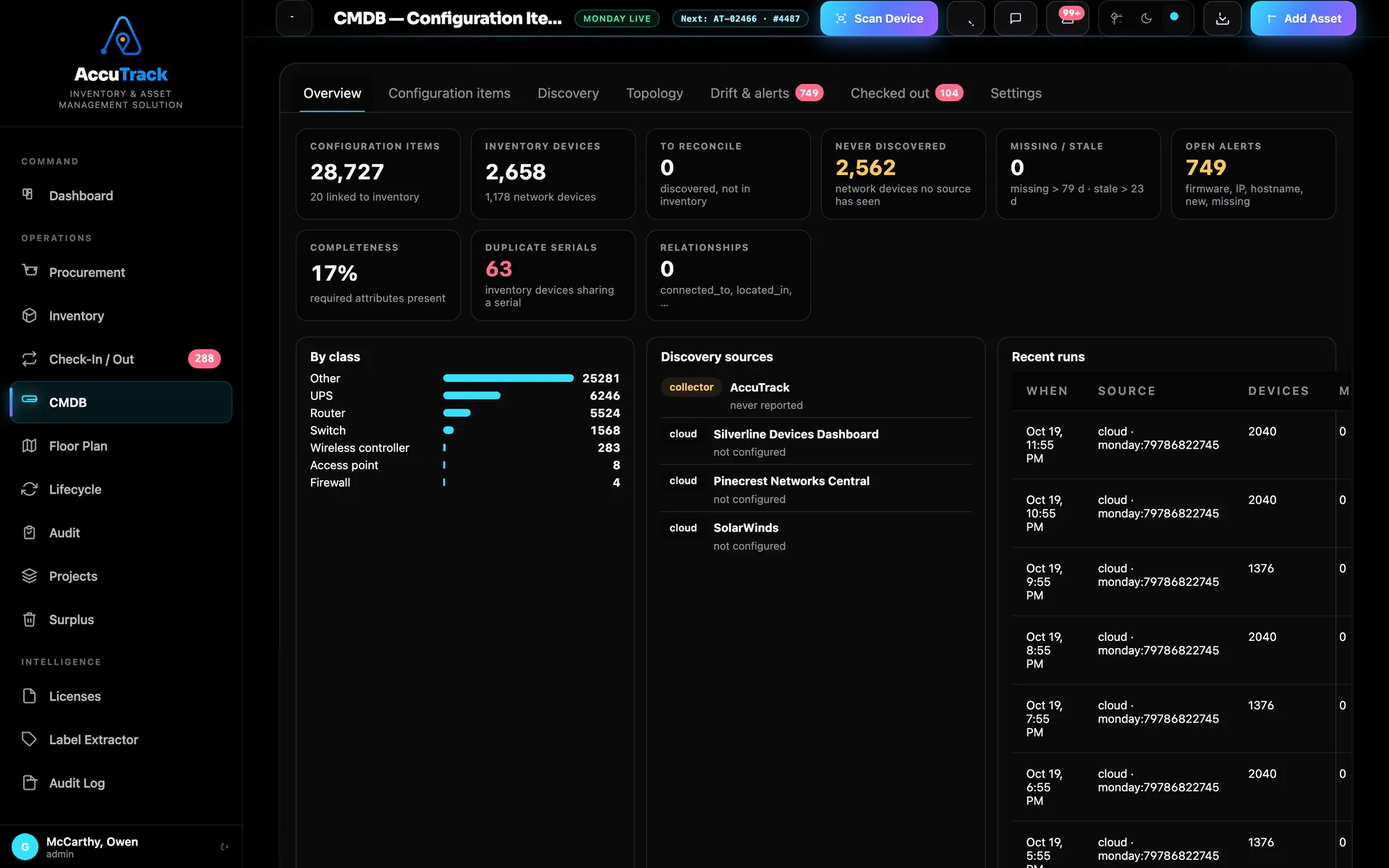
A CMDB that argues with the inventory
Configuration items discovered on the network sit beside what the inventory says you own: never discovered, missing or stale, duplicate serials, and open alerts for firmware, IP and hostname drift.
- Discovery from an on-site collector plus cloud controllers
- Scheduled runs with a full history
- Topology and relationships in the same place
-
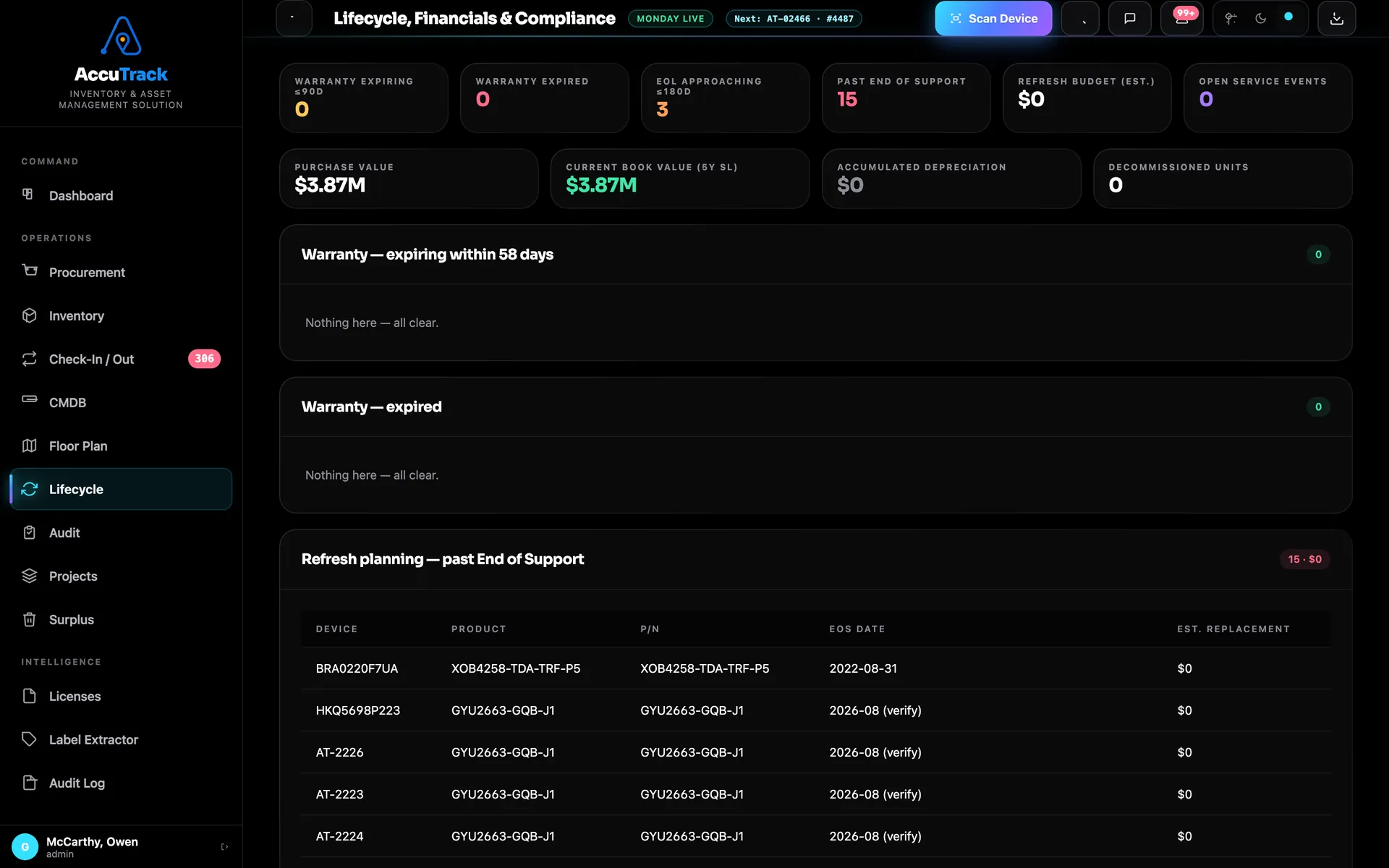
Lifecycle, financials and compliance
Warranty expiring and expired, end-of-life approaching, past end-of-support, purchase and book value, and a refresh plan that lists each device past support with its estimated replacement.
- Depreciation on a five-year straight line
- Refresh budget estimate for the next cycle
- Service events tracked per device
-
The same app in your pocket
Scan a label with the phone camera to check a device in or out, move it to a new shelf, or audit a room, with the same records and permissions as the desktop.
- Camera scanning for QR labels
- Floor plan and check-in / out on a phone
- Photos attached to every movement
One system of record for every device you own
Know where everything is
Room, row, rack and shelf for every device, updated by every scan, move and check-in, on a live map of your depots and server rooms.
Prove it on demand
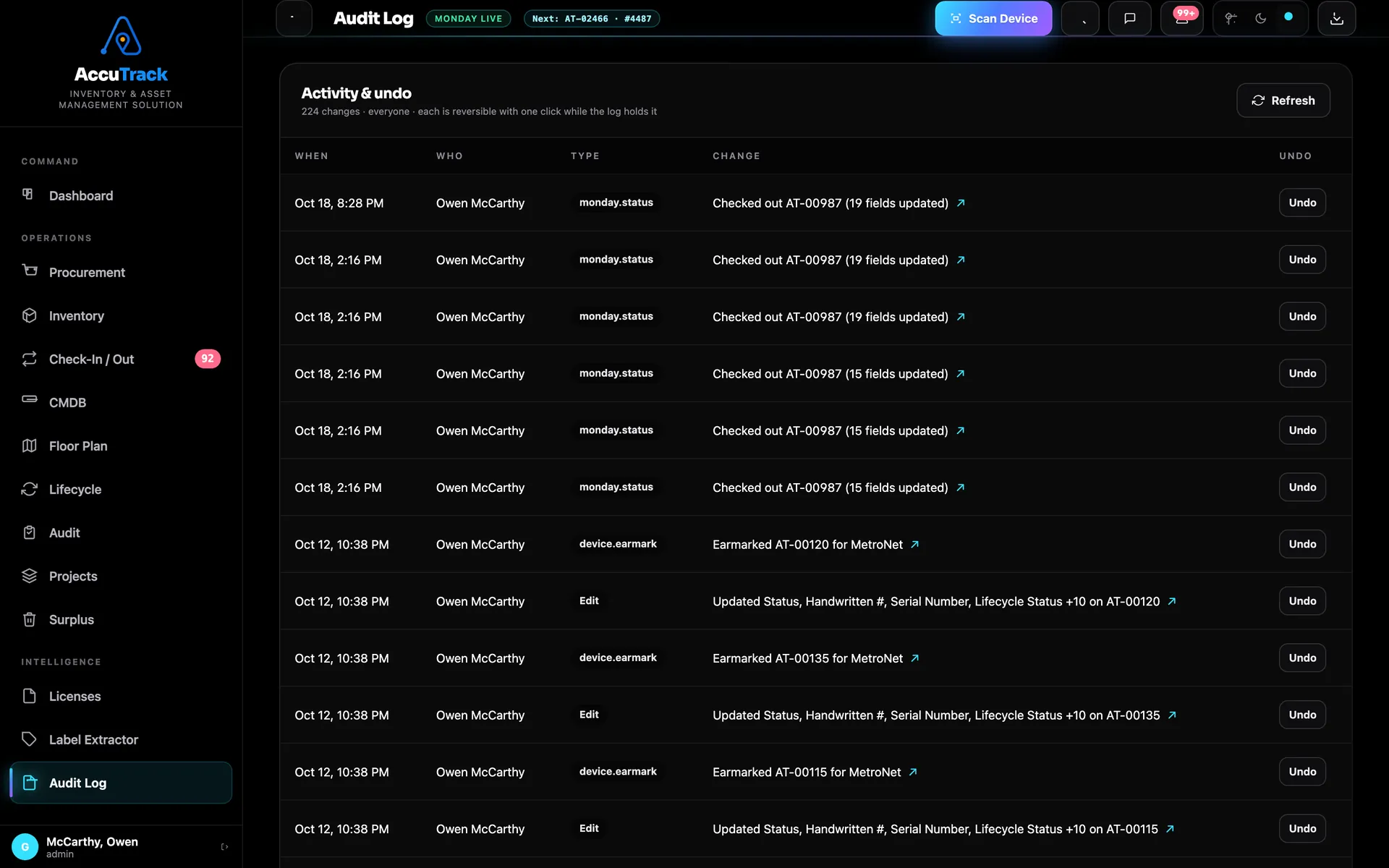
Custody records with photo evidence, audits that reconcile as you scan, and a trail of who changed what and when.
Plan before it's urgent
Warranty, end-of-life and depreciation roll up into a quarter-by-quarter refresh forecast, with alerts before anything lapses.
Protect it like it matters
MFA for everyone, module access enforced by the server on every request, and encryption with a key your account controls.
Disciplines
Built for IT. Ready for everything you own.
One record per asset, wherever it lives. Pick a discipline to see which screens do the work.
Every laptop, switch, firewall and radio, reconciled against what the network actually sees.
Serial, asset tag and QR label on every unit. Discovery finds what is on the wire, the CMDB argues with the inventory, and audits confirm what is really on the shelf.
- Network discovery reconciled against the inventory
- Warranty, end-of-life and refresh planning per device
- Scan to audit, check out or move anything
ModulesInventory · CMDB · Audit · Lifecycle
Equipment that is not a computer still gets a record.
Machinery, plant and physical equipment carry the same record as a server: where it sits, who has it, what it cost, what it is worth today, and every service event logged against it.
- Service and repair events on the asset's record
- Purchase value, book value and depreciation per asset
- Warranty and end-of-support dates surface before they lapse
- A 90-day audit rotation across every location
ModulesLifecycle · Service log · Audit · Floor Plan
Sanctuaries, halls and the equipment inside them, on one map.
Give each sanctuary, hall and classroom a place in the floor plan, then put sound desks, instruments, AV gear and sacred objects on the record with photos, custody and value.
- Buildings, rooms and shelves as a browsable map
- Photos and custody for high-value items
- Check-out for loaned equipment, with a return trail
- Purchase records for capital projects and repairs
ModulesFloor Plan · Check-In/Out · Procurement · Audit
Issue a device to a student, see it come back, and tie every purchase to the grant that paid for it.
1:1 laptops and tablets, textbook sets and lab equipment move through check-out and return with photos. Purchase orders carry a cost code, so grant audits start from the record instead of a spreadsheet.
- Check-out and return per student or classroom, with photos
- A cost code on each purchase order for funding audits
- Seats owned versus assigned per software license, with renewal alerts
- Vehicles, kitchen and safety equipment as assets in the same system
ModulesCheck-In/Out · Procurement · Licenses · Inventory
Stock by SKU and serial, with a flag before you run out.
Units, available and deployed per SKU in one sheet. Set a threshold and the dashboard raises an attention item when stock drops below it. Retire what no longer sells through a surplus workflow with an estimated resale value.
- Units, available and deployed per SKU
- Reorder thresholds that raise an attention item on the dashboard
- Purchase orders from request to receipt, with totals
- Surplus and disposition with estimated resale value
ModulesInventory · Procurement · Surplus · Dashboard
Asset lifecycle
One record, from purchase order to disposal.
Most organizations track a device in five different places over its life. Scroll through a laptop's life and watch its single AccuTrack record fill in, stage by stage.
Latitude 7450 laptopDevice record · sample
AT-02031Built for the scrutiny you're under
Public agencies answer to auditors and the public. Companies answer to finance and the board. AccuTrack is built for both.
Outcomes
What changes when AccuTrack is the record
devices tagged, located and tracked through their lifecycle in the reference deployment.
Follow one devicecustody photos linked to the devices they document, from 440 check-in and check-out submissions.
See custodybetween background refreshes of the inventory, so the dashboard is current when you open it.
Take the tourautomated checks confirm each person can reach only the modules and data they were granted.
See the controlsFigures from AccuTrack's reference deployment, September 2026.
Built on the standards your auditors already use
NISTSP 800-53 Rev. 5
Every control documented against its 800-53 family, from account management to monitoring.
CISAWS Foundations Benchmark v3.0
The AWS environment is scored against it continuously by AWS Security Hub.
AWSFoundational Security Best Practices
Evaluated alongside GuardDuty threat detection and AWS Config change recording.
OAuth2.0 + PKCE · SAML 2.0 · OIDC
Standards-based sign-in, ready for Microsoft Entra ID and other identity providers.
Security you can hand to your CISO
AccuTrack runs serverless on AWS, built for the scrutiny of a public-sector security review. Every request crosses eight layers before it reaches your data. Select a layer to see what each one does.
Every control is mapped to NIST SP 800-53 Rev. 5 and defined in code, so your security team can review the environment before it is deployed. Ask for the security brief.
Pricing
Priced for a church closet and a county data center
One product, billed by the number of devices under management, never by seat once you are past the starter tier. Every plan includes scanning, QR labels, check-in/out with photo evidence, rotating physical audits and the activity log. Public-sector, education and nonprofit discounts are built in, not negotiated.
Churches · clubs · one-room shops
Community
$0forever
Up to 100 devices · 2 users
- Hosted by AccuTrack, nothing to install
- Inventory, QR labels, check-in/out, audits
- Activity log with undo
- Community support
Small business · single schools · parishes
Team
$59per month, billed annually ($708/yr)
Up to 500 devices · 10 users
- Everything in Community
- Floor plan: rooms, rows, racks, shelves
- Lifecycle, warranty and licence tracking
- Email support, next business day
Most chosen
School systems · county departments · mid-size IT
Professional
$249per month, billed annually ($2,988/yr)
Up to 2,500 devices · unlimited users
- Everything in Team
- Single sign-on: Microsoft Entra ID, SAML 2.0, OIDC
- Integrations API, signed webhooks, ServiceNow CMDB sync
- Network discovery collector and CMDB
- AI photo reading and assistant
- Priority support · $0.90 per device per year beyond 2,500
Counties · large districts · enterprise IT
Enterprise
$12,000per year, from
Up to 10,000 devices · unlimited users
- Everything in Professional
- Dedicated single-tenant deployment, in your AWS account or ours
- Your domain and certificate, your identity provider
- 7-year audit retention and the full NIST 800-53 control mapping
- Named onboarding and a security review package for your CISO
- $0.75 per device per year beyond 10,000
Federal · state agencies · regulated industries
Government & Federal
Quoteon your paper
Any size · unlimited users
- Everything in Enterprise
- Deployed in the AWS account and region your policy requires
- Your controls, your logging destinations, your key management
- Quoted through the cooperative contract or reseller you already use
- Procurement, security and accessibility questionnaires answered up front
Discounts, built in
State and local government and K-12 or higher education: 20% off. Nonprofits and houses of worship: 40% off. Three-year terms: a further 10%. They stack with the estimator below.
What counts as a device
Anything with its own record: a switch, an access point, a laptop, a phone, a UPS, a spare in a box. Device types, people, locations, projects and licences are free.
Where it sits in the market
Published 2026 figures put IT asset management at roughly $2 to $15 per managed asset per year, with flat small-team hosting from about $400 a year and enterprise suites well into six figures. At each tier's capacity AccuTrack works out to roughly $0.75 to $1.45 per device per year, with the security posture of the expensive end.
Estimate
What would AccuTrack cost us?
Professional
$2,988per year
List $2,988 · no discount applied
$2.49 per device per year
Up to 2,500 devices, unlimited users, SSO, integrations API, discovery and AI included.
Request a briefingIntroductory pricing, 2026, in US dollars, billed annually. Any tier starts with a 30-day pilot on your own data. Usage of the AI assistant and photo reading is included under fair use; network discovery runs on your side at no charge.
On the phone
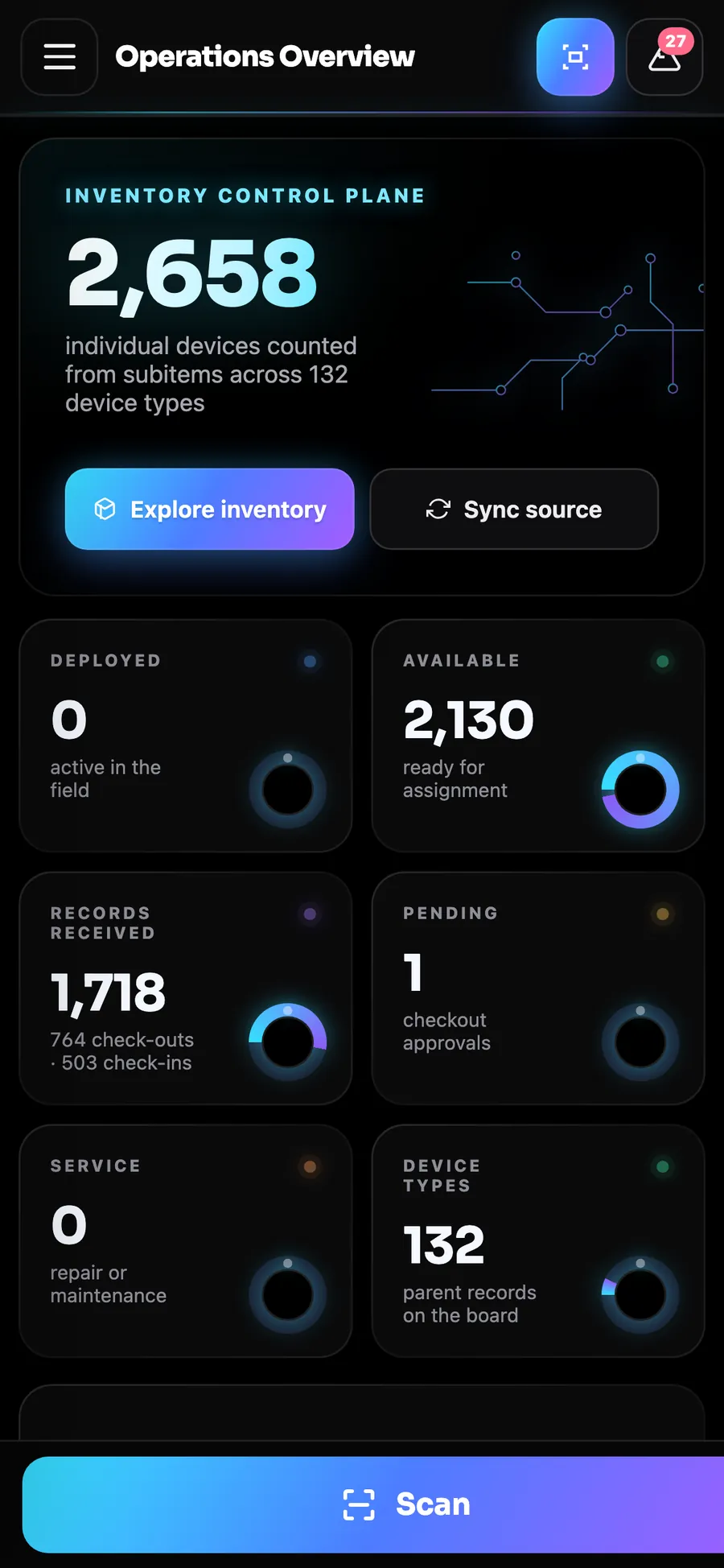
The same application, sized for a phone
Open AccuTrack on a phone and a Scan button sits across the bottom of every screen, so the floor, the stockroom and the loan desk work from the same record as the office.
- A Scan button pinned to the bottom of every screen on phones
- Scan a device to move it to a new room, row, rack or shelf
- Scan to check a device in, request a checkout or record a physical audit
- QR labels for every location, printed from the Floor Plan
- Light, Dark and Black appearance picker
Get started
From spreadsheet to system of record
- Step 01Bring in what you have
Import spreadsheets from Excel or CSV, or connect the Monday.com boards you already keep. Nothing is re-typed.
- Step 02Tag and place
Reserve tags, print QR labels, and record room, row, rack and shelf as you walk the space.
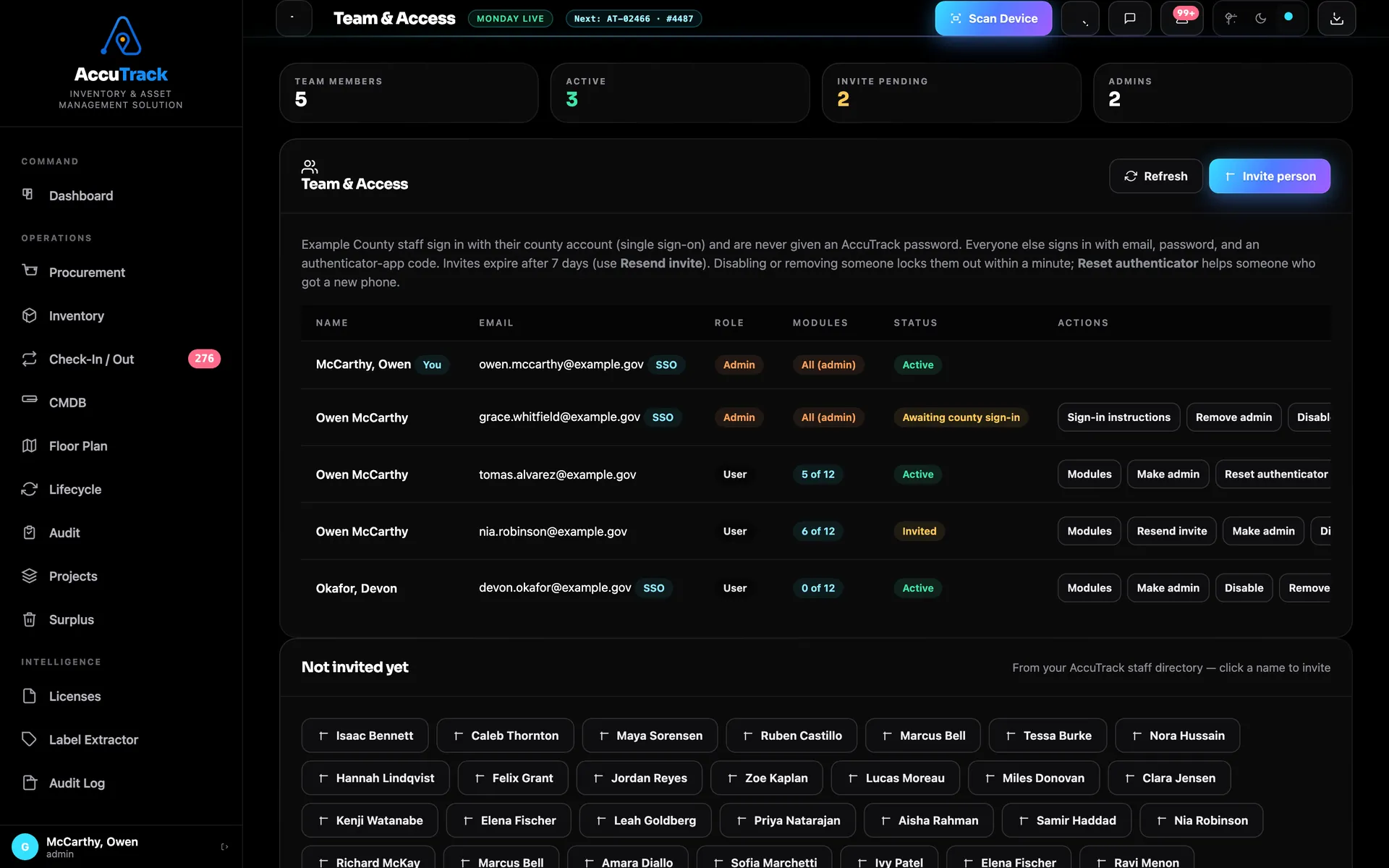
- Step 03Invite your team
Invite people by work email and choose the modules each can open. MFA is set up at first sign-in.
- Step 04Connect your stack
Turn on single sign-on with your identity provider, then link ServiceNow and SolarWinds.
Get started
Let's account for every asset you own.
Tell us about your fleet and we will come back with a briefing plan, a pilot path and pricing for your size of estate. Already a customer? Sign in below.
Request a briefingWalk through the modules your team would use, with an architecture review for your security staff.
Start a 30-day pilotYour data, your AWS region, every module unlocked, no commitment at the end of it.
Pricing and procurementPlans from 100 to 10,000+ devices, with public-sector, education and nonprofit discounts.
Already a customer? Sign inOpen your AccuTrack account with your organization's single sign-on and MFA.
Tell us about your fleet
A few details so the right person replies, usually within one business day.